
Your words, ready to copy
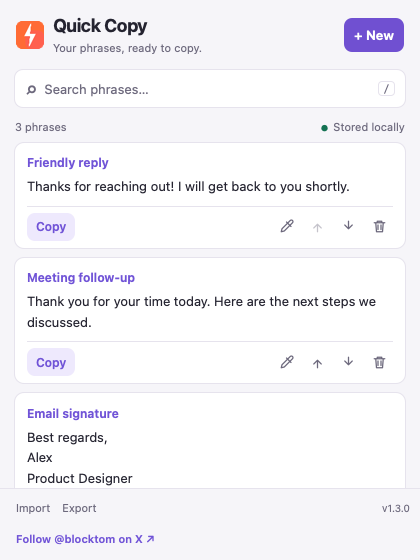
Quick Copy for Safari keeps email replies, signatures, addresses, support responses and other reusable text in a compact Safari toolbar popup. Add an optional title, find a phrase with search, and copy it when you need it.
The interface is English. Your phrases can contain any language, with line breaks and whitespace preserved. Light and dark appearances follow your system preference.
The preview shows the current interface with example phrases. Version 1.3.0 has been submitted to Apple and is awaiting review.
Set up in Safari
After installing the Mac app, open Quick Copy for Safari and select Open Safari Settings. Enable the extension under Extensions, then click its icon in Safari’s toolbar.
This Safari edition uses the toolbar popup. It does not provide the Chrome edition’s side panel. Save edits before closing the popup; unsaved drafts are not kept automatically.
Bring your phrases from Chrome
Use Export in Quick Copy for Chrome, then Import in Safari. Review and confirm the import to merge new phrases. Exact duplicates are skipped. Chrome and Safari have separate local libraries and do not synchronize automatically.
Export a backup before uninstalling the extension or clearing browser data. Keep exported files somewhere you trust: they contain the phrase text you chose to save.
One purchase, no advertising
The Safari browser extension has been submitted to the Mac App Store, with a one-time U.S. launch price of US$9.90. Its companion Mac app helps you enable the extension in Safari. It has no subscription, in-app purchase, advertising or referral registration links. It is not yet available for purchase.
Privacy
Phrases stay in Safari’s local extension storage. The extension does not read website content, collect browsing history, run analytics or send your phrases to a developer server. Copying, importing and exporting happen when you request them.
Read the Quick Copy for Safari Privacy Policy.
Support and developer
Created by blocktom. For help, email [email protected]. Include your macOS and Safari versions and a description of the problem; do not send sensitive phrases.